WatchMaker Watch Faces
- 3.7
- Rating
- 5.00M
- Installs
- Free
- Price
 Analysis by App-foxy
I spent time with WatchMaker Watch Faces as a personalization app for giving a compatible smartwatch a more individual look. My first impression was that it is less like a single watch-face design tool and more like a large browsing and customization space. That difference matters: the app is appealing if you enjoy comparing styles, adjusting your display, and changing the mood of your watch, but it can feel less straightforward if you only want one attractive face installed quickly.
Developed by androidslide, the app is free to start and is listed for Everyone. It has already passed five million installs, with an average rating of 3.7 from roughly ninety-seven thousand ratings and about nine thousand two hundred written reviews. Those figures suggest a product with a broad audience but also a mixed experience. After using it, I understand why: the creative side is enjoyable, while the path between choosing a face and seeing it on the watch can require patience.
What makes the collection useful, and where people get stuck
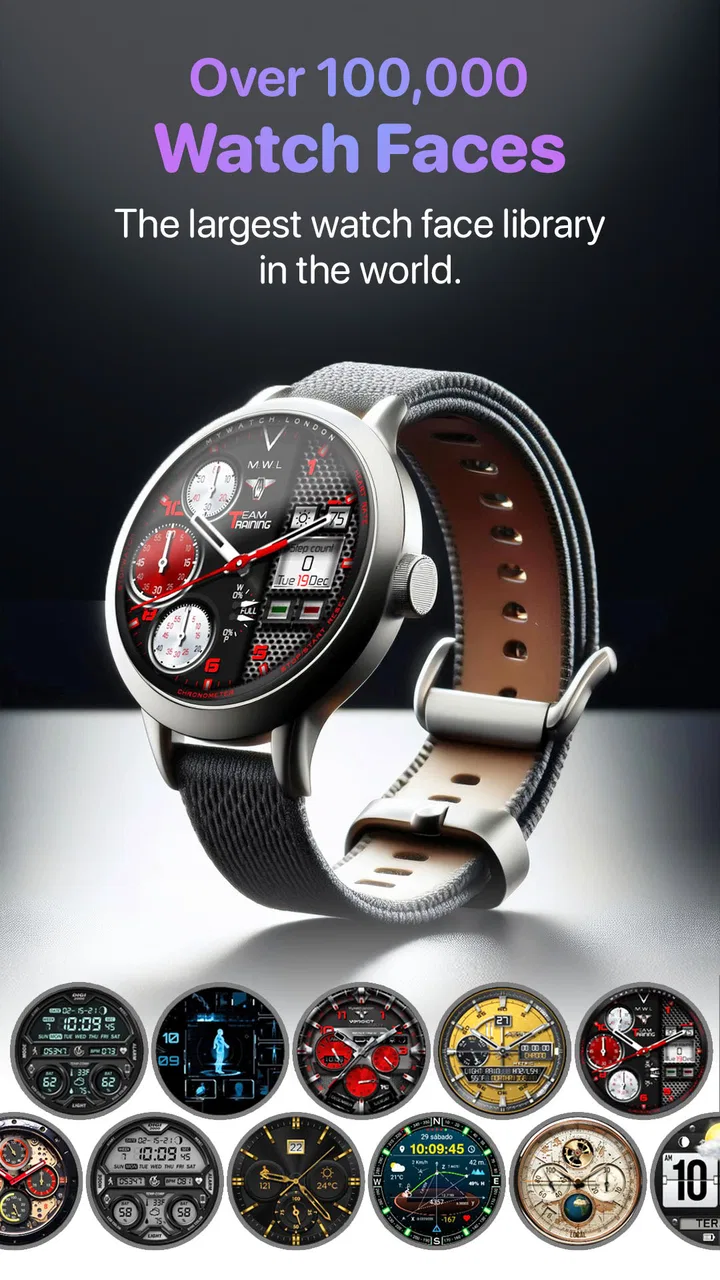
The main attraction is variety. Instead of relying on the small group of faces bundled with a watch, I could browse designs that changed the character of the device completely. A simple digital layout works well for checking the time during a busy day, while a more decorative design makes the watch feel like an accessory rather than a small phone screen. The collection also includes seasonal ideas, including Christmas-themed faces, so it is easy to refresh the look without replacing the hardware.
You May Also Like

 Blood Strike: 2.5 Anniversary
Blood Strike’s Loadouts Turn Every Drop Into a Tactical Gamble
A close look at Blood Strike’s custom loadouts: how fast access to signature weapons reshapes its battle royale rhythm, rewards preparation, and narrows the gap between fights.

 Pandora - Music & Podcasts
Pandora’s Music Is Easy to Start, but Harder to Recover
Pandora’s strength is its low-effort path from a seed to a station. Its weak spot is how much confidence it asks you to place in connection, setup, and quiet recovery.

 8 Ball Pool
 Is Built on Rivalries, Rematches, and Routine
A close look at the rivalries, rematches, shared routines, and unanswered safety questions that turn a quick pool match into a persistent mobile community.

 Samsung Music
’s Quiet Strength Is Playing What You Already Own
Its reach comes less from spectacle than from dependable access to a personal library. That simplicity is both the app’s strongest retention engine and its ceiling.

 AccuWeather: Weather Radar
AccuWeather Review: A Quick, Clear Forecast for Everyday Decisions
For everyday plans, the best forecast is the one you can understand quickly. AccuWeather makes rain timing, radar, and local conditions easy to act on, with a few trade-offs.

 Hill Climb Racing
Why Hill Climb Racing Still Turns Crashes Into One More Run
A tiny car, a bumpy hill and one more upgrade: Hill Climb Racing keeps resurfacing because its simple chaos makes every near-miss feel personal.
More From Our News Desk



The first point of friction is deciding what “using a face” actually means. Browsing, previewing, selecting, customizing, and sending a design to the watch are separate steps in the overall experience. A face can look perfect in the catalog and still need adjustment once it is displayed on a smaller screen. I found it helpful to treat the first choice as a starting point instead of assuming it would be the final result.
Another common stumbling block is expecting every design to behave identically. A minimal face may be readable immediately, while a detailed one can make the time, date, or other visible information harder to scan. My practical advice is to judge a face from arm’s length, not only from the large preview. If the important information is not obvious in that view, changing colors or choosing a simpler layout will usually help more than repeatedly reinstalling it.
The app is especially suitable for people who like visual experimentation. I could spend a few minutes comparing styles, then return later when I wanted something more formal or more colorful. It is less suitable for someone who sees the watch face as a one-time setting and does not want to browse a large collection. In that case, the default faces supplied with the watch may be quicker and less distracting.
Start with compatibility and a clean setup
Before spending time choosing a design, I would check that the phone, watch, and companion connection are working normally. WatchMaker Watch Faces is not a replacement for the watch’s own connection software. If the watch is not paired correctly, or if the companion process is not active, a face may appear selected in the app without appearing on the wrist. That can make the app seem broken when the real issue is the connection between devices.
A useful setup routine is simple. I would keep the watch close to the phone, confirm that the watch is showing as connected in its usual companion app, and then open WatchMaker. After selecting a face, I would wait for the transfer to finish before making another change. Tapping through several designs quickly can make it unclear which selection is currently being processed.
I also recommend testing one uncomplicated design first. This is a practical diagnostic step, not just a style preference. A basic face makes it easier to tell whether the connection works, whether the watch updates correctly, and whether the chosen design is readable. Once that succeeds, moving to a more elaborate face is less frustrating because you know the basic workflow is sound.
The current version is 9.0.6, and I would keep the app updated when an update is available through the normal app store. I would also avoid changing several related settings at once. If the watch suddenly shows an old design, it is much easier to identify the cause when only one face was selected and one transfer was attempted.
There is also a small but important expectation around cost. The app itself is free, but it includes in-app purchases ranging from $0.99 to $49.99 per item. I would browse first and decide what level of customization I actually need before paying for anything. Someone who only wants occasional visual changes may be perfectly satisfied with the free experience, while a dedicated collector may see value in spending more. The right choice depends on how often the watch face will be changed, not simply on the size of the collection.
A calmer workflow when a face does not appear
When a selected face did not show up as expected, the most reliable response was to work backward rather than repeatedly tapping the same option. I would first check the watch itself, then the phone’s connection, then the selected design. If the watch is displaying another face normally, the hardware is at least responding. If it is disconnected or not updating anywhere, the problem is probably outside the catalog screen.
My recovery sequence would be:
Return to the watch’s normal companion app and confirm that the watch is connected.
Open WatchMaker again and select one face only.
Give the transfer time to complete before leaving the screen.
Check the watch after the update rather than relying only on the phone preview.
If necessary, restart the phone and watch, reconnect them, and repeat the simple test face.
This approach avoids a surprisingly common mistake: changing the design repeatedly while the original transfer is still unresolved. If the issue is temporary communication between the devices, more selections only create confusion. A clean retry gives you a clear answer about whether the workflow has recovered.
Another useful habit is to keep notes about which face was selected when troubleshooting. That sounds excessive, but it helps when a design has a busy layout or unusual colors. If the watch updates but looks wrong, the issue may be visual readability rather than installation. Rechecking the preview and choosing a more legible face can solve the problem faster than treating every imperfect result as a failed transfer.
I would also avoid judging performance from a single delayed update. Wireless communication can take longer than expected, particularly when the watch is not nearby or when another connection task is happening at the same time. Waiting, checking the connection, and trying one controlled transfer is more useful than clearing everything immediately. General troubleshooting should be gradual so that you do not lose track of what changed.
Recognizing problems that are not caused by the app
WatchMaker Watch Faces sits in the middle of a chain involving the phone, the watch, the watch’s operating environment, and the connection software. That means not every failure belongs to the app. If other watch settings also refuse to update, notifications are delayed, or the watch repeatedly disconnects, I would investigate the broader pairing setup before blaming the face collection.
The same applies when the watch displays a design but the screen looks different from the preview. Screen size, brightness, and the watch’s own display behavior can change how colors and small details appear. A design that looks balanced on a phone may feel crowded on the wrist. In that situation, the app may have transferred the face correctly; the better solution is to choose a design with stronger contrast and fewer decorative elements.
Battery behavior can also affect expectations. A highly detailed face may be less practical for someone who wants the simplest possible display, even if it looks impressive. I would not choose a face only because it has more visual elements. For work, travel, or exercise, quick readability is usually more valuable than decoration. For evenings, weekends, or seasonal use, a richer design can be worth the trade-off.
If the app opens but the catalog or selected face behaves unusually, I would start with ordinary checks: confirm the phone has a working connection, close and reopen the app, and restart the phone if the problem persists. I would avoid installing unofficial files or changing advanced device settings just to force a result. Safe, reversible steps are preferable, especially when the watch itself still works normally.
How it compares with default faces and simpler alternatives
The obvious alternative is the watch’s built-in collection. Those faces usually win for speed and predictability. They are already integrated with the device, so there is less browsing and less uncertainty about whether the design will transfer. If you want a reliable face for a meeting or a busy morning, the default option may be the better tool.
WatchMaker’s advantage is the breadth of choice and the feeling of ownership that comes from changing the watch’s appearance more often. A default collection can become familiar quickly; this app gives me a reason to revisit the watch as a personalization project. That makes it a stronger choice for enthusiasts, gift recipients who want to make a watch feel personal, and anyone who enjoys matching the face to clothing, seasons, or daily routines.
It also differs from a single-purpose editor. A focused editor may be easier if you already know exactly what you want to build. Here, browsing is a major part of the experience. I would choose WatchMaker when I want inspiration and a wide range of ready-made directions, not when I want the shortest possible route from a blank screen to one custom design.
One everyday example explains the trade-off well. Before leaving for work, I might choose a restrained face with clear time information and avoid a decorative layout that requires a closer look. On a weekend, I could switch to a more expressive seasonal design. The value is not just having many options; it is being able to treat the watch face as a small context-setting choice. The drawback is that this flexibility can turn a quick setting into a browsing session.
Who should use it, and who should skip it
I would recommend it to someone who enjoys customizing Android or iOS-connected wearable experiences, likes visual variety, and is willing to perform a few setup checks. It is also a good fit for people who quickly become bored with factory-installed faces. The free entry point makes it easy to explore before deciding whether paid items are worthwhile.
I would be more cautious recommending it to someone who dislikes troubleshooting, has an unreliable watch connection, or expects every selection to appear instantly. The app cannot make an unstable pairing reliable by itself. I would also point a minimalist user toward the default collection if the goal is only a clean clock with no ongoing browsing.
Age suitability is broad because the app is rated Everyone, but the practical audience is still shaped by interest. Children, adults, and older users can all appreciate a clearer or more attractive watch face, yet the catalog is most rewarding for anyone who enjoys making small visual changes. If you prefer to set a device once and forget it, the collection may feel excessive.
For me, the most important tip is to separate three decisions: whether the watch is connected, whether the face transfers, and whether the face is actually readable. Treating those as different questions prevents a lot of wasted effort. A successful transfer does not automatically mean the design is a good daily choice, and an unattractive result does not automatically mean the installation failed.
My practical verdict after using the collection
WatchMaker Watch Faces is strongest when personalization itself is the reason you are using it. I like the freedom to move beyond the watch’s standard appearance, and the large collection gives the app a clear identity in the personalization category. Seasonal designs add an easy reason to return, while the free starting point lowers the risk of trying it.
Its weakness is the extra layer between browsing and wearing. Connection checks, transfer timing, and screen readability all matter, and a user who expects instant results may become impatient. The 3.7 average reflects that this is not a universally effortless experience. In my view, the rating makes sense: the creative potential is appealing, but the practical experience depends heavily on the watch setup and on choosing designs that suit a small display.
The developer androidslide has kept the app positioned as a broad watch-face destination rather than a narrowly focused utility. Version 9.0.6 is the version I would use, and I would approach purchases selectively because individual in-app items can cost from $0.99 to $49.99. I would not pay simply to solve a connection problem; I would first confirm that the free workflow works correctly.
My final recommendation is straightforward. Try one simple face, verify the connection, and judge the result on your wrist rather than only on the phone. If that process feels enjoyable, the collection can make the watch feel much more personal. If even that controlled test feels like too much work, the built-in faces are probably a better match. For users who want choice and do not mind a little setup discipline, WatchMaker Watch Faces is a worthwhile free personalization app with genuine creative range, provided its flexibility is treated as the feature rather than as a promise of instant simplicity.
FAQs for WatchMaker Watch Faces
01What is WatchMaker Watch Faces and what does it offer?
WatchMaker Watch Faces is a versatile app that provides users with a wide selection of customizable watch faces for smartwatches. It supports various smartwatch platforms, including Wear OS and Tizen. The app offers both free and premium options, allowing users to personalize their watch faces with different designs, widgets, and interactive features.
02Is WatchMaker Watch Faces compatible with my smartwatch?
WatchMaker Watch Faces is compatible with most smartwatches running Wear OS and Samsung’s Tizen. However, it's important to check the app's compatibility with your specific smartwatch model before downloading. The app’s description in the Google Play Store or Apple App Store usually provides a list of supported devices.
03Are there any costs associated with using WatchMaker Watch Faces?
The app is free to download and offers a variety of free watch faces. However, premium options are available for purchase, which unlock additional features and exclusive designs. Users can subscribe to a monthly or yearly plan, or make one-time purchases for specific watch faces or feature packs.
04Can I create my own watch face using WatchMaker Watch Faces?
Yes, WatchMaker Watch Faces includes a powerful editor that allows users to create custom watch faces. You can design your own using various tools and elements provided in the app. Additionally, users can share their creations in the WatchMaker community, fostering an environment of creativity and collaboration.
05How do I ensure my watch faces sync correctly with my smartwatch?
To ensure successful syncing, make sure your smartwatch is compatible, and both the watch and phone app are updated to the latest versions. Ensure Bluetooth is enabled, and follow the app’s on-screen instructions for syncing. If issues persist, restarting both devices and consulting the app’s help section might resolve connectivity problems.
Pros
- Extensive collection of customizable watch faces.
- Easy to navigate interface with intuitive design.
- Supports a wide range of smartwatch brands.
- Regular updates with new features and designs.
- Community-driven with user-created designs.
Cons
- Some features require a premium subscription.
- May drain battery faster on some devices.
- Occasional bugs with certain smartwatch models.
- Initial setup can be confusing for beginners.
- Limited offline functionality.

WatchMaker Watch Faces
Gallery